
A BEGINNER'S GUIDE TO PLAYLIST TYPES
A Beginner's Guide to Playlist Types – Explore different playlist types like M3U and HLS. Learn their uses, features, and how they compare. Get insights into IPTV and streaming. In short, this guide explains playlist types in plain language.
playlist types: Direct answer
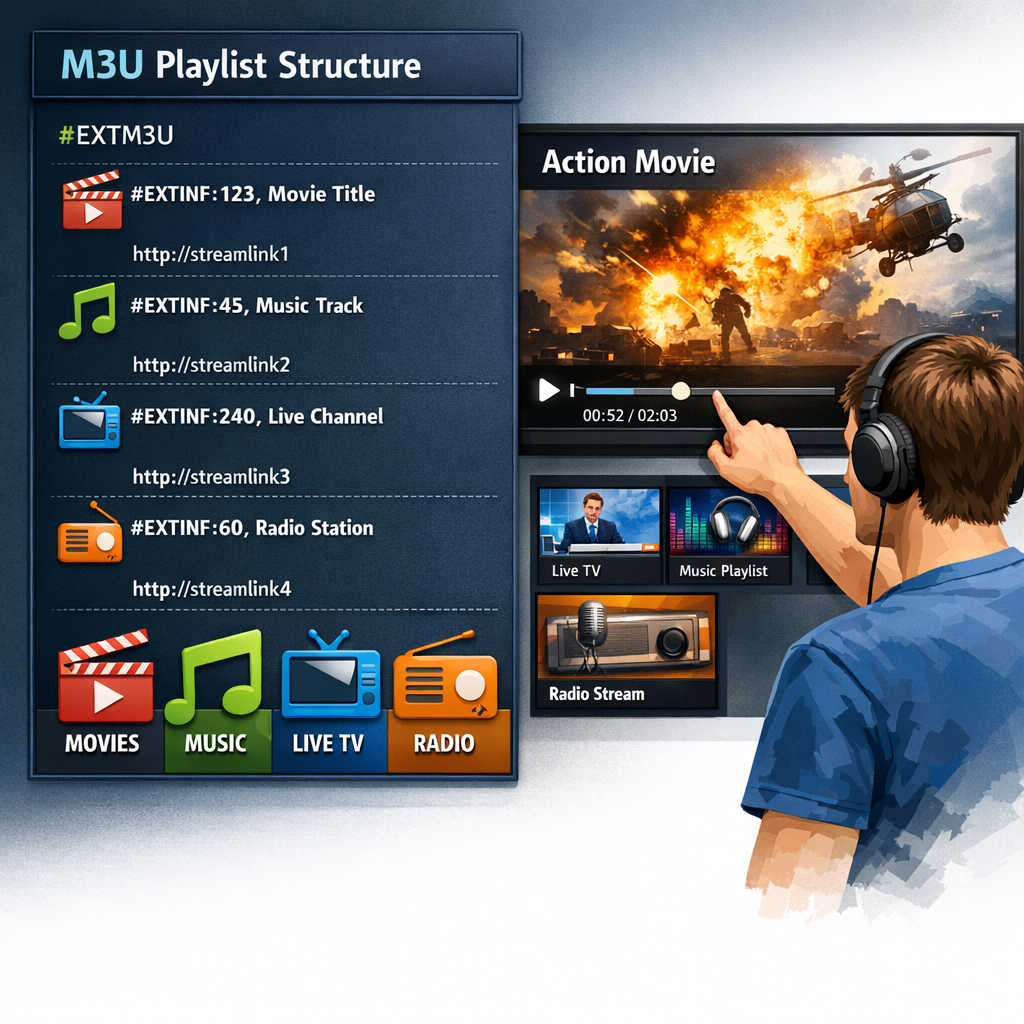
Playlist types, like M3U and HLS, are essential for streaming media. M3U playlists organize channels, while HLS playlists manage video streams. Both enhance user experience in IPTV and online media.
playlist types: Key Takeaways
- M3U playlists organize media streams for easy access.
- HLS playlists enable smooth video streaming.
- Both playlist types enhance the user experience in IPTV.
- Understanding these formats can improve your media consumption.
What’s New Today
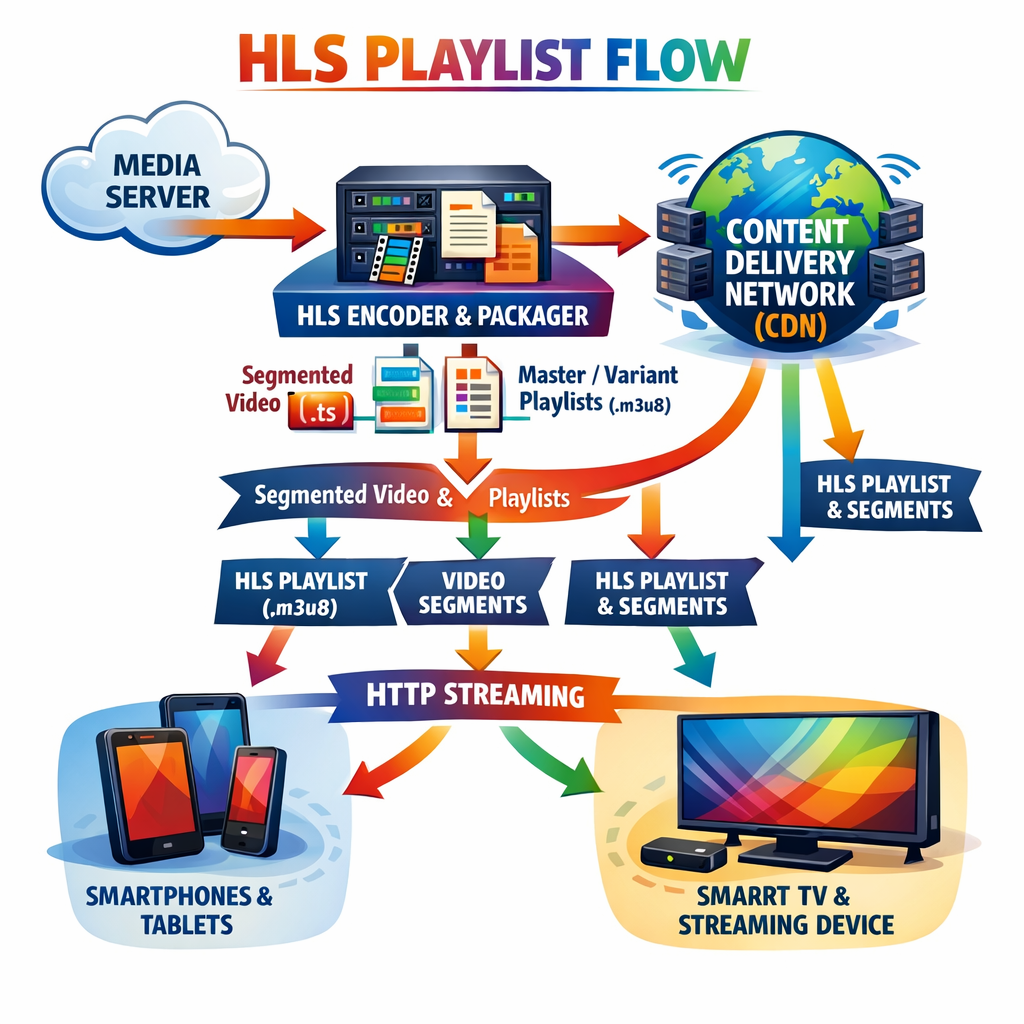
Playlist types are evolving rapidly in response to the changing landscape of digital media consumption. New formats and technologies are emerging to enhance streaming experiences for users across various platforms. For example, M3U playlists have become more user-friendly, allowing for easier access and management of media content. Meanwhile, HLS playlists are increasingly becoming the standard for live streaming due to their ability to adapt to varying network conditions and provide a seamless viewing experience [1].
Overview
Watch on YouTube
Playlist types are essential for organizing and delivering media content effectively. Two of the most popular types are M3U and HLS. M3U playlists are simple text files that list media streams, making them easy to create and share among users. On the other hand, HLS, or HTTP Live Streaming, is a protocol that delivers video content in real-time, allowing for dynamic streaming that adjusts to the viewer’s internet speed [2].
Key Features
M3U Playlists
- Text-based format that is easy to read and edit
- Lists media files or streams in a straightforward manner
- Easy to create and share, making them popular among casual users
- Commonly used in IPTV services, allowing users to access a variety of channels [3]
HLS Playlists
- Supports adaptive bitrate streaming, which adjusts the quality of the video based on the user’s internet speed
- Breaks video into small segments, allowing for smoother playback and quicker loading times
- Ensures smooth playback on various devices, from smartphones to smart TVs [4]
- Widely used for live broadcasts, making it a go-to choice for streaming events such as sports and concerts [5]
Pros and Cons
M3U Playlists
- Pros: Simple to use, widely supported across various media players and devices
- Cons: Limited features compared to HLS, which may affect performance in certain scenarios [6]
HLS Playlists
- Pros: High-quality streaming that adapts to network conditions, providing a better user experience
- Cons: More complex to set up, requiring a deeper understanding of streaming technology [7]
Key Insights
Understanding playlist types can greatly enhance your media experience. M3U playlists are great for organizing channels and accessing content quickly, while HLS playlists are ideal for streaming video content that requires real-time delivery. Both formats have their strengths and weaknesses, and the choice between them often depends on the user’s specific needs and technical expertise [8].
Patterns
Many users prefer M3U playlists for their simplicity and ease of use. However, as streaming technology advances, HLS is becoming more popular due to its ability to deliver high-quality video and adapt to varying network conditions. This shift indicates a growing trend towards more sophisticated streaming solutions that prioritize user experience [9].
Controversies
Some users debate the effectiveness of M3U versus HLS. While M3U is easier to use and set up, HLS offers better performance for live streaming, particularly in scenarios where network conditions fluctuate. This debate continues as technology evolves, with many users advocating for the adoption of HLS for its superior capabilities [10].
Blind Spots
Many users overlook the importance of playlist types in enhancing their streaming experience. Understanding how they work can significantly improve media access and enjoyment. For example, knowing how to create an M3U playlist can help you customize your media access, while understanding HLS can lead to better streaming quality during live events [11].
Opportunities
As streaming services continue to grow and evolve, there is a significant opportunity to innovate playlist types. New formats could emerge that combine the best features of M3U and HLS, potentially offering users a more versatile and powerful way to manage their media content. This innovation could lead to enhanced user experiences and greater accessibility [12].
Advanced Breakdown
For advanced users, M3U playlists can be customized with additional metadata, such as descriptions and genre tags, to enhance organization and searchability. HLS playlists can also be configured for different devices, ensuring optimal playback across various platforms, which is crucial for maintaining a high-quality viewing experience [13].
Comparison
When comparing M3U and HLS, M3U is simpler and easier to manage, making it a popular choice for casual users. In contrast, HLS provides a more robust solution for streaming video content, particularly in live scenarios. Each format has its place in the world of media consumption, and the choice often depends on the user’s specific needs and technical capabilities [14].
What People Are Asking
Many people want to know how to create M3U playlists or how HLS works. These questions highlight the growing interest in understanding playlist types and their applications in modern media consumption. As more users seek to enhance their streaming experiences, the demand for information on these topics continues to rise [15].
Popular Searches and Questions
Common searches include “how to create M3U playlists” and “what is HLS streaming?” These queries show that users are eager to learn more about these formats and how they can improve their media experiences. The increasing interest in these topics reflects the broader trend of users becoming more engaged with the technology behind their entertainment [16].
FAQ
- What are M3U playlists? M3U playlists are files that list media files or streams. They are often used for IPTV services, allowing users to access a variety of channels easily.
- How do HLS playlists work? HLS playlists manage video streams by breaking them into small segments. This allows for smooth playback and quick loading times, making it ideal for live streaming.
- Can I create my own M3U playlist? Yes, you can create your own M3U playlist by listing the URLs of your favorite media streams in a text file.
- What is the difference between M3U and HLS? M3U is a simple playlist format that lists media files, while HLS is a streaming protocol that delivers video content in real-time, adapting to network conditions for optimal performance.
References
Share
Related reading
- How to Use Live TV M3U Playlists for Streaming
- The Ultimate Guide to Live TV Playlists
- IPTV Smarters Downloader: Features and Benefits
- How to Stream Baseball Live with IPTV M3U8 Links
- Firesend: Your New Go-To for Fire TV Downloads
- How to Create M3U8 Playlists for Live TV


